
MiXplorer Silver File Manager
Hootan ParsaProductivity
4.0541.00 Reviews
- Version
- 6.70.3-Silver
- Installs
- 100.00K
- Age Rating
- Everyone
Screenshots
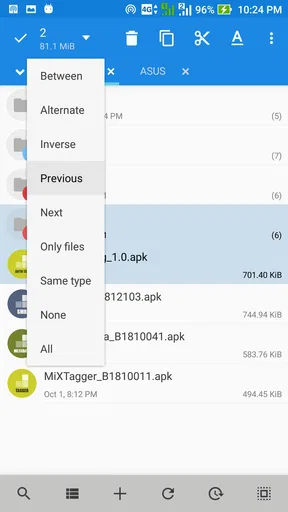
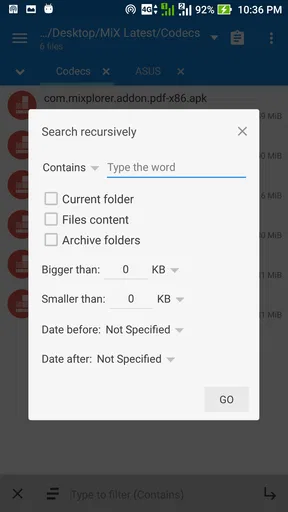
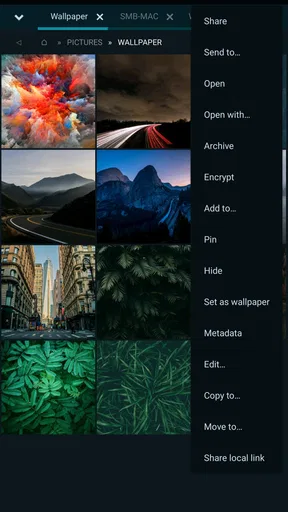
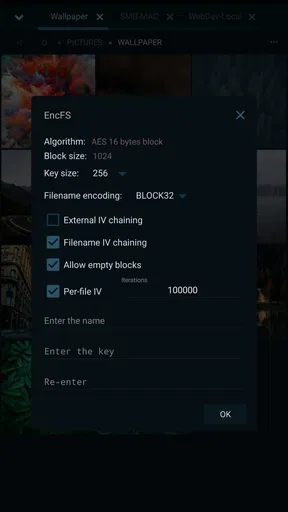
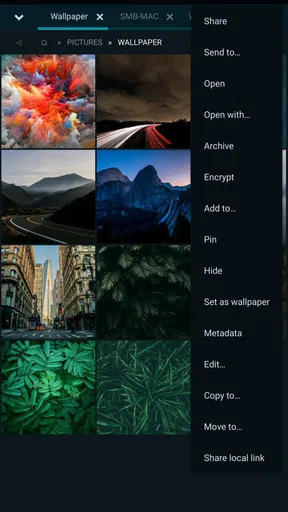
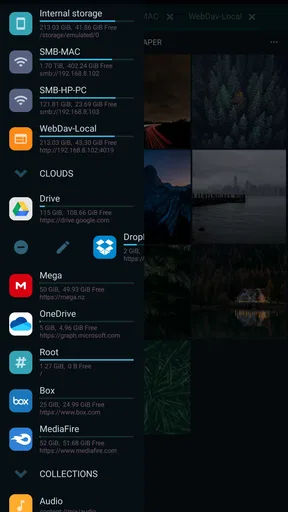
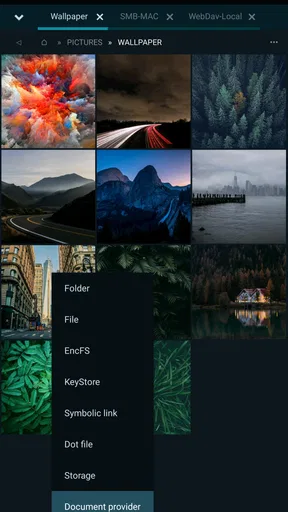
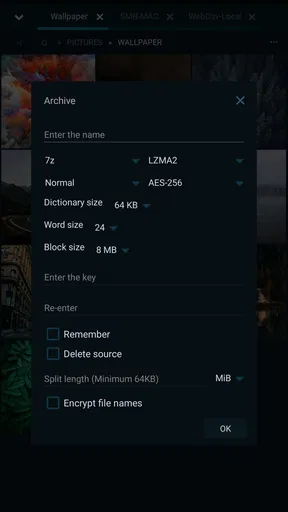
Our Review of MiXplorer Silver File Manager
 Analysis by Appyee
My file problem usually starts in the middle of something else: a document arrives in a download, a photo needs moving, or an archive has to be unpacked before I can share its contents. The default file browser can handle simple moves, but switching between folders and apps gets tedious once several files are involved. That is the kind of everyday mess where MiXplorer Silver File Manager makes sense: it is an Android productivity app for people who want more control over how files are browsed and handled, rather than just a place to look at them.
From a crowded Downloads folder to a usable handoff
I think of a practical file-manager workflow as a chain: find the incoming item, inspect it, put it where it belongs, then pass it to another app or storage location. MiXplorer Silver is built for that hands-on approach. Its tabs are useful when I need to keep a source folder open while choosing a destination, and its file operations make common cleanup tasks less dependent on bouncing between screens.
For example, imagine I have downloaded a compressed folder of reference images and need to keep a few pictures on the device while sending the archive to cloud storage. I can browse the download, extract what I need, and manage the resulting files without treating each step as a separate hunt through the phone. The benefit is not that every task becomes automatic; it is that I can keep the pieces of the job in view and make deliberate choices about where they go.
Getting Started with MiXplorer Silver
First things first, getting MiXplorer Silver File Manager up and running is a breeze. The app is available for download on both Android and iOS, and installation is as straightforward as it gets. Once you open it, you’re greeted by a clean, intuitive interface that makes navigating your files a walk in the park.
What I loved right off the bat was the customizable nature of the interface. You can tweak the theme, layout, and even the color scheme to suit your mood. It’s like having a personal assistant that not only organizes your files but also looks good doing it.
Features That Shine
Now, let’s talk features, because this app is packed with them. Whether you're a casual user or a tech-savvy pro, there's something here for everyone.
- Comprehensive File Support: MiXplorer Silver supports a wide array of file formats, so whether you’re dealing with documents, images, or zips, it’s got you covered.
- Cloud Integration: You can easily sync your files with popular cloud services like Google Drive, Dropbox, and OneDrive. This makes accessing your files from anywhere a cinch.
- Advanced File Operations: If you enjoy getting into the nitty-gritty, the app offers advanced operations like file encryption, compression, and extraction. It’s like having a Swiss Army knife for files.
- Tabbed Browsing: A personal favorite feature of mine! Much like a web browser, you can open multiple tabs and switch between them effortlessly. Say goodbye to back-and-forth navigation.
User Experience
Using MiXplorer Silver is a smooth experience, thanks to its user-friendly design. The learning curve is minimal, and even if you’re not tech-savvy, you’ll find yourself navigating through its features like a pro in no time.
The app’s performance is stellar – it’s fast, responsive, and handles large volumes of files without breaking a sweat. I tested it with a variety of file operations, and it didn’t disappoint. It’s like having a mini-computer in your pocket, ready to tackle any file management task you throw at it.
That said, I would not recommend turning on every advanced option before you know what it changes. A file manager is powerful precisely because it can alter, move, or remove things; a rushed tap can have consequences. I find it wiser to do a small test with an unfamiliar operation, check the destination, and only then repeat it across a larger batch. That habit matters more than any shortcut when files are important.
Customization and Control
Customization is where MiXplorer Silver truly shines. You can tailor almost every aspect of the app to fit your preferences. From adjusting the toolbar to setting up custom commands, the level of control it offers is unmatched.
For those who enjoy tinkering, you’ll appreciate the app’s support for plugins. You can enhance its functionality with additional features, making it a truly versatile tool in your digital arsenal.
My practical tip is to customize for repetition, not novelty. If I regularly move a certain kind of download into a project folder, a toolbar arrangement or command that puts the relevant actions within reach can save small bits of effort over time. I would still keep the interface restrained at first: adding options before I understand the basic navigation can make a capable tool feel busier rather than faster.
When a more capable file browser pays off
The strongest case for this app is a phone that doubles as a workbench. Someone who receives documents, sorts photos, handles compressed folders, and shifts files between device storage and cloud services can get more value from its flexibility than someone who only opens the occasional download. A student organizing course material, for instance, can keep a source location and a destination visible in separate tabs, extract an archive, and then move selected files into a cleaner folder structure.
It also suits people who like to decide how their tools behave. Theme and layout adjustments are pleasant, but the more meaningful control is being able to shape a repeated workflow around the operations used most often. Encryption and compression can be useful in specific situations, too, though I would treat them as tools to understand rather than buttons to press casually. Before relying on an encrypted file as the only copy of something valuable, I would make sure I understand how I will access it later.
Compared with a basic file browser, MiXplorer Silver gives me a wider set of ways to work without leaving the file-management context. That is the appeal: tabs, archive handling, cloud access, and advanced operations sit under one roof. The trade-off is that a basic browser may be easier to learn and entirely sufficient for someone who just wants to find a photo or clear a download. If I only needed occasional browsing, I would choose the simplest option already comfortable on my device rather than pay for a deeper toolkit I would rarely use.
It is also worth separating file management from automatic backup. Being able to browse or transfer files through cloud integrations does not, by itself, mean every local item is continuously backed up. I would use the app to carry out a specific transfer, then check the destination in the cloud service before deleting the local copy. That small verification step avoids confusing “I selected the files” with “I know they are safely available elsewhere.”
What to expect before making it your default
MiXplorer Silver is a paid Android app by Hootan Parsa, priced at $5.99. It has an average rating of 4.0 from around four thousand ratings, with over one hundred thousand installs. It is rated for Everyone, was released on December 19, 2018, and its current version is 6.70.3-Silver, with Android 5.0 as the minimum operating-system requirement. Those details place it in a useful middle ground: established enough to have a substantial audience, but still a purchase I would make because I need its specific controls, not simply because I want any file browser.
The purchase question comes down to how often I handle more than one kind of file task. If I regularly move items between local folders and cloud storage, unpack archives, or prefer tabs and custom controls, paying for a specialist can be easier to justify than stitching together several simpler tools. If my needs are limited to opening downloads, renaming a file now and then, and deleting clutter, I would skip it and stick with a basic option. The app’s depth is an advantage only when I actually use that depth.
There is a learning trade-off even with a friendly interface. A person who has never used tabs in a file manager may need a little time to understand why keeping two locations open helps, and the many customization choices can distract from the simple task at hand. I would start with browsing, moving, copying, and extracting, then explore commands or plugins only when a real need appears. That approach makes the app feel like a tool I am gradually tailoring, not a control panel I must master on day one.
Where the workflow can snag
The same flexibility that makes MiXplorer Silver appealing can make it the wrong fit for someone who wants a nearly invisible utility. More settings and operations mean more decisions, and file actions deserve care because a misplaced move or deletion can create a real cleanup job. I would avoid experimenting on the only copy of an important document, and I would confirm the destination after a large transfer rather than assume that a completed tap means the files are where I expect.
Cloud handoffs also add a step that a local move does not have: the connection between the app and the chosen service has to be set up and used correctly. If I am sharing a file with another person, I still need to choose the right destination and then use that service’s own sharing flow when appropriate. MiXplorer can make files easier to reach and manage; it does not remove the need to check access, organization, or whether I am sending the intended version.
Another sensible limit is platform and purpose. This is an Android file manager, so an iPhone user should not treat it as an iOS download choice. And while its productivity tools can support document handling, it is not a replacement for a dedicated editor when the job is to revise a spreadsheet, write a report, or make detailed changes to an image. I use a file manager to locate and hand off material; I use the right specialist app to edit it.
Final Thoughts
So, is MiXplorer Silver File Manager worth the download? In my opinion, absolutely. It’s a powerful, flexible file manager that caters to both casual users and tech enthusiasts. The combination of robust features, ease of use, and seamless performance makes it a standout choice in a crowded market.
If you’re looking to streamline your file management and take control of your digital life, give MiXplorer Silver a shot. You might just find it becomes an indispensable part of your daily routine. Happy exploring!
Verdict
Strengths of MiXplorer Silver File Manager
- Highly customizable user interface.
- Supports a wide range of file formats.
- Integrated cloud storage support.
- Fast and efficient file search.
- Doesn't show intrusive ads.
Limitations of MiXplorer Silver File Manager
- No free version available.
- Steep learning curve for beginners.
- Occasional minor bugs reported.
- Limited community support.
- Some features require root access.
Similar Picks in This Category
View All
Google Calendar
Google LLC4.6

Google Drive
Google LLC4.3

Google Assistant
Google LLC3.9

Microsoft OneDrive
Microsoft Corporation4.6

Samsung Calendar
Samsung Electronics Co., Ltd.4.1

Microsoft OneNote: Save Notes
Microsoft Corporation4.6
Frequently Asked Questions
What is MiXplorer Silver File Manager and what makes it unique?
MiXplorer Silver File Manager is a comprehensive file management app for Android devices, known for its user-friendly interface and extensive customization options. Unlike other file managers, it offers a wide range of features such as cloud storage support, tabbed browsing, and advanced search capabilities, making it a versatile tool for both casual and power users.
Does MiXplorer Silver support file transfers to cloud storage?
Yes, MiXplorer Silver File Manager supports file transfers to various cloud storage services. Users can seamlessly integrate their cloud accounts such as Google Drive, Dropbox, and OneDrive, allowing them to upload, download, and manage files directly from the app, enhancing productivity and accessibility.
Is MiXplorer Silver File Manager safe and secure to use?
MiXplorer Silver File Manager is designed with security in mind. It offers features such as file encryption and password protection to safeguard sensitive information. The app is regularly updated to address security vulnerabilities, ensuring a safe environment for managing your files and data.
What kind of customization options does MiXplorer Silver offer?
MiXplorer Silver provides extensive customization options, allowing users to tailor the interface and functionality to their preferences. Users can adjust themes, icon sets, and layout configurations. Additionally, the app supports various plugins to extend its capabilities, catering to both casual and advanced users.
Does MiXplorer Silver File Manager support multiple file formats?
Yes, MiXplorer Silver File Manager supports a wide range of file formats, including common ones like images, videos, and documents. It also handles more advanced formats such as archives and scripts. This versatility ensures that users can open, view, and manage almost any type of file directly within the app.
